

Thursday, September 24, 2015
BV Cares will have a meeting tomorrow


Friday, September 18, 2015
Sunday, August 16, 2015
Classroom 'Touchstone Creeds'

Last year I made it a personal goal to ask more questions and begin encouraging my students to ask more questions. I feel like these are still things which I need to work on. This year I've been studying about "Growth Mindset" (developing positive attitudes toward & habits of learning which improve learning) and sharing my motivations or purposes for teaching with students. As part of this I'm introducing classroom "Touchstone Creeds." These aren't negative rules or policies and procedures, they're positive goals which ideally we will all agree to aspire to as a class as sort of a social compact.
Assignment from Summer Course on Character Education:
Now that we have looked at the different positive character traits and virtues, and reflected on the qualities found in a community of virtue, decide on a Touchstone Creed for your classroom that will be the vision that will frame everything that happens inside your classroom.In general, a Touchstone is a basis of comparison, a reference point against which other things can be evaluated. It sets the measure for all subsequent worth.
A Character Touchstone is a concise, memorable guide to right behavior. It is not a complete moral system, but a summary that is easy to remember and to teach. It is a short list of rules to which you can refer automatically in moments of stress or indecision. In a classroom (or school-wide) a Touchstone provides resonance, sets expectations and unifies.
These are the "Touchstone Creeds" I developed for my classes this year:
One of the concepts I try to stress in Civics class is that we always need to consider that Civic Virtue = General Welfare = Common Good. Some of the principles I spend the most time teaching in Civics include Equality, Rights,Social Contract, Liberty, Justice, and Unity. Some of the things that my middle school colleagues and I at Boyer Valley have discussed that we hope to instill in our students are Respect, Responsibility, Empathy & Compassion (Caring).
I REALLY want to just adopt this quote from Teddy Roosevelt- "Look up, not down- Look out, not in- Look forward, not backward- and lend a hand."
I've always used structural frameworks to teach visual art. Discipline Based Art Education
(DBAE) consists of Art History, Design/Aesthetics, of course actual Art Making and Art Criticism. Art Criticism involves critical thinking skills such as description, analysis, interpretation and evaluation. It's always a challenge to get students to talk about each other's work in a positive, supportive atmosphere. You always imagine a "creative community," almost like a miniature artists' colony in your classroom. Unfortunately immaturity and social dynamics don't always permit that. Just a few of the virtues that I hope to have my Art students adopt are Respect, Responsibility, Caring, Expression, Vision, Curiosity, Creativity, Aesthetics. Those and keeping your hands off of other people's projects and cleaning up after themselves!
I REALLY want to just adopt this quote from Teddy Roosevelt- "Look up, not down- Look out, not in- Look forward, not backward- and lend a hand."
MS CIVICS CLASSES (8th Grade):
We're all responsible making this a learning space
We respect everyone's rights & dignity
We show grit to grow & to try again when we fail
Everyone matters, everyone's voice should be heard
I've always used structural frameworks to teach visual art. Discipline Based Art Education
(DBAE) consists of Art History, Design/Aesthetics, of course actual Art Making and Art Criticism. Art Criticism involves critical thinking skills such as description, analysis, interpretation and evaluation. It's always a challenge to get students to talk about each other's work in a positive, supportive atmosphere. You always imagine a "creative community," almost like a miniature artists' colony in your classroom. Unfortunately immaturity and social dynamics don't always permit that. Just a few of the virtues that I hope to have my Art students adopt are Respect, Responsibility, Caring, Expression, Vision, Curiosity, Creativity, Aesthetics. Those and keeping your hands off of other people's projects and cleaning up after themselves!
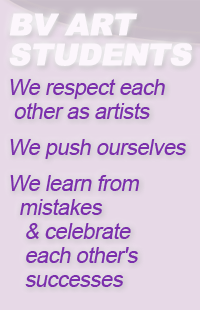
BV ART STUDENTS (7th-12th Grades):
We respect each other as artists
We push ourselves
We learn from mistakes
and celebrate each other's successes


and celebrate each other's successes
PURPOSE DRIVERS
The following are more mission statements than touchstones since they're more about the purpose for each organization rather than about fostering a culture or climate within the classroom. The Cheerleading one is revised a little from one we developed back in 2002. The only thing I really changed was replacing "Stirring-Up Spirit" with "Building Bulldog Spirit."
I've wanted to create something for our Yearbook for some time. We had had a couple old tag lines; "preserving Bulldog memories for over 90 years," and "Student-Produced Yearbook," but neither one seemed very fun or inspiring. I may ask student staffers to either "ratify" or replace it though. We'll see how it goes.


Wednesday, April 1, 2015
Hey #BV, Got Pictures from DC?
We'd LOVE to include some pictures of the Trip to Washington DC in this year's 'Archive' Yearbook. If you or your parents have any, would you please share some with us? THANKS! We want to make this YOUR yearbook.
Here are four EASY ways to get your pictures in the Yearbook.
1. Upload them to this handy Google Drive Folder: "2015 DC Trip"
2. Attach them to an email to Mr. Mallory malloryt@boyer-valley.k12.ia.us
(or to Yearbook Editor Frank Davis or Staffers Liberty Monk or Jared Habrel)
(or to Yearbook Editor Frank Davis or Staffers Liberty Monk or Jared Habrel)
3. Download the absolutely FREE phone/iPod app ReplayIt* from Jostens and then upload then directly too the yearbook online.
4. Join ReplayIt* on your laptop or chromebook for FREE at www.replayit.com and upload them there.
*If you share pictures through ReplayIt, they're shared with everyone online too (for a year)- and if you purchase a yearbook, you'll receive a password to have access to them online permanently as part of your own "digital time capsule."
Monday, March 23, 2015
Take Increased Devotion...

Here's the portion of Lincoln's Gettysburg Address which you're responsible for memorizing before the end of Fourth Quarter in May. You can also follow the link below to a text version on our class wiki.
http://bv-civics.wikispaces.com/Memory+Work
- Ask yourself, what is the unfinished work Lincoln wants us to be dedicated to?
- What is the great task remaining before us?
- What would it mean for us to take increased devotion to their cause?
- What does Lincoln's of, by & for at the end have to do with the three principles Jefferson included in the Declaration, which we've been studying this year?
Wednesday, March 4, 2015
Substitute Lesson Plans for WED MAR 4
1&2 | CIVICS: Student have essays assigned in goole classroom. They may use their notes and should write the entire class period. Essays should be done by the end of the hour.
3 | PAINTING: Students should work on Abstracted-Facet Self Portraits. Please have them clean up with 5 minutes left in the period.
4 | PLANNING PERIOD
6 | WEB PROGRAMMING: Students have an online test over "Dreamweaver 8; Tutorial 2," I will post a link to the test on our google classroom page. They may use their notes. When they are finished, they may resume working on the Client Project Websites they are building which are due on Friday.
MS LUNCH
5 | 7th Grade ART: DEAR Time (silent reading 11:49-12:12pm. Students should complete the "Neutralizing scales" in oil pastels which I will have on the island counter, When they are finished, they may "free-paint" with the oil pastels on scrap paper. Please have them clean-up/return supplies to the box in the last 5 minutes of class.
7 | 8th Grade ART: Students should continue working on their on Edward Hopper Painting, as with all Art classes, please remind them to clean up in the last 5 minutes of class.
8 | YEARBOOK: Remind Yearbook Staffers to please work on pages at least 3 Days this week, otherwise use their time wisely as a study hall.
Thursday, February 26, 2015
Registering for classes next year?

If you like computers, taking pictures, or have a lot of school pride, I'd like you to think about joining Yearbook. We need responsible, creative, and especially purple-powered people to create the best books possible. Read over this PDF of 30 real-world skills that you'll develop by working on Yearbook. It's not just a class or a club, it helps prepare you for the job market and for college. THINK ABOUT IT.
Subscribe to:
Posts (Atom)













 follow me on twitter
 follow me on facebook
